“As the newly appointed IT Manager at our company, I was tasked with implementing the Xoralia policy management tool, and the experience has been nothing short of impressive.”
Cybersecurity
TwinStream: compliance evidence on demand for every policy
Powered by Xoralia. Implemented by our team at Content Formula, the consultancy behind Xoralia.

By Amber Oakes, Product manager
TwinStream is a fast-growing cybersecurity business in Cheltenham. With Cyber Essentials and ISO expectations rising, it set out to evidence that the right people had attested to the right documents, by version and date, without depending on manual effort to get there. TwinStream now manages its policies and wider controlled documents through Xoralia, inside the Microsoft 365 tools its team already works in, and the evidence is there whenever it’s asked for.
The challenge
As TwinStream grew, policies needed to move to a home of their own with an opportunity to make the current versions easier for every member of staff to find. Reviews happened once a year, and sign-off relied on TwinStream’s IT manager and his manager working through each policy together on a Teams call, then printing, signing and emailing individual documents back to be filed.
That worked well while TwinStream was smaller, and it gave the team a solid, hands-on process to build from. As the business grew and continued to manage Cyber Essentials and ISO-related expectations, an informal, email-led process was ready to become more structured, so that every policy could be read, signed and tracked with confidence. TwinStream also holds secure project documentation that calls for its own kind of protection: some material was legally required to sit somewhere private, connected to specific permissions, rather than in a space the whole business could browse. Automating approvals had already moved from a nice idea to something TwinStream actively wanted before the project began.
Does any of this sound familiar?
Book a demo and we'll show you how Xoralia handles it inside your own Microsoft 365 environment.
Why build the structure before switching anything on?
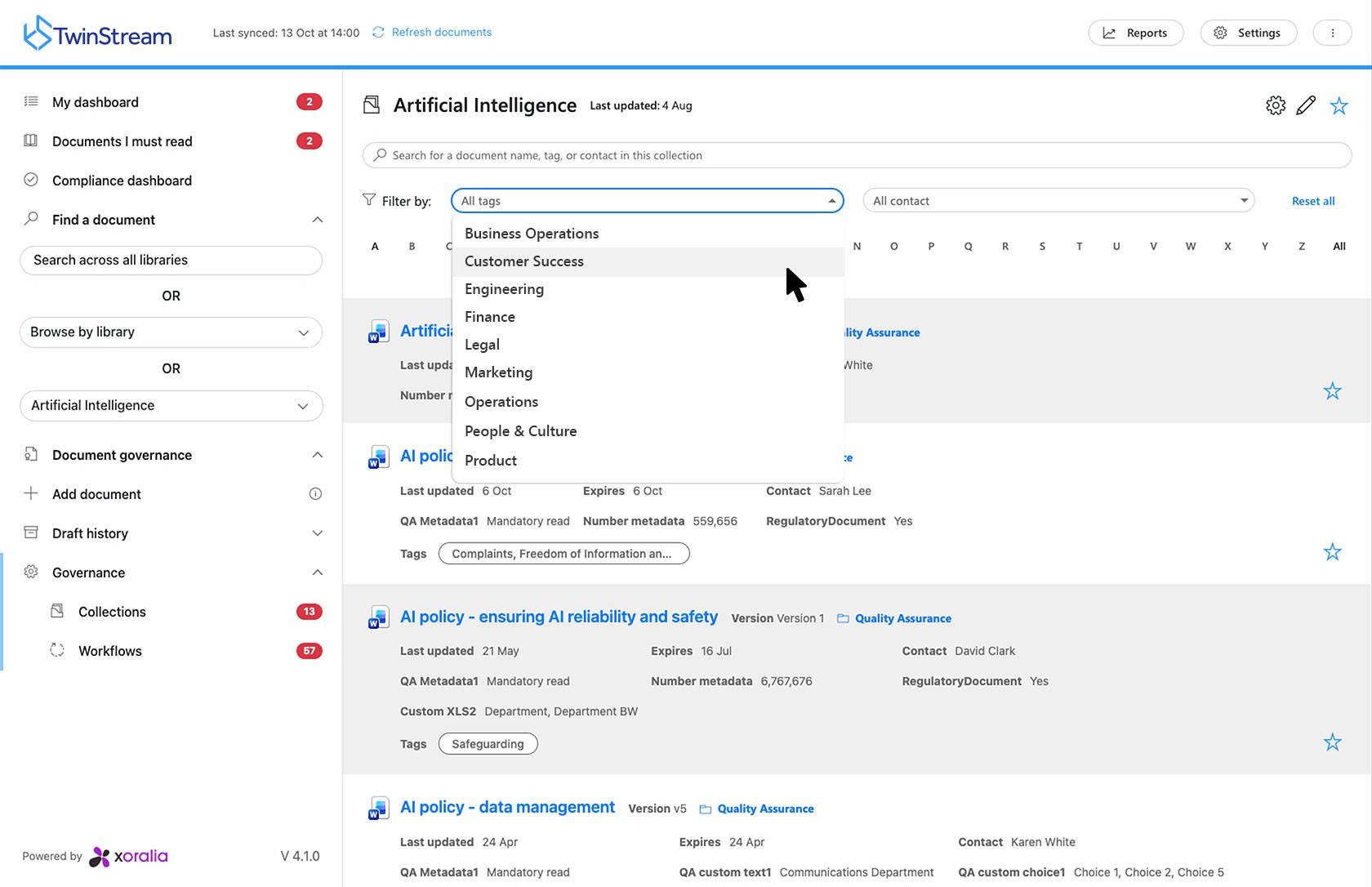
TwinStream began with strong foundations. The starting point was a review of the existing email and HR-system based approach, followed by setting up a dedicated comms site and document library for Xoralia, and building a taxonomy term set so policies could be tagged and filtered rather than just listed alphabetically. Metadata gives Xoralia’s policy centre something solid to build on, and a structured way of tagging means employees can filter by department or policy type to find the one they need straight away.
Training and the more advanced configuration followed, once the foundations were in, TwinStream began using Xoralia day to day. The team returned for workflow training and then worked with our team on the specifics of approvals history, review history and document differential views, so TwinStream could see exactly what had changed in a policy since the last version. As the business grew, TwinStream also came back to discuss syncing project and client-specific Teams sites into Xoralia, and to add document search to Xoralia as its policies grew in number. Structure first, workflow visibility second, search and scale third: that sequence is why Xoralia’s adoption was a success.
What was delivered
Policy attestation. Xoralia's attestation feature replaced TwinStream's old sign-and-email process outright. Staff now attest to policies inside Teams, and Xoralia sends reminders until the record is complete rather than a member of the IT team having to remember to ask. TwinStream now runs policy attestation at 97% completion, with every attestation timestamped by employee and version, up from a process that relied on people remembering to print, sign and email a document back.
Policy library and taxonomy. Xoralia gave TwinStream's policies one place to live, tagged using the taxonomy created at the start so staff can filter by department or policy type rather than hunting through a flat list, or checking the HR system instead. Consolidating everything into a single, controlled location means only the current approved version of each policy is in circulation.
Configured approval routes, approvals and review history. Xoralia's configured approval routes took over the approval process TwinStream had been running informally on a Teams call between the IT Manager and his manager once a year. Approvals now move through a defined approval route, and the approvals history, review history and document differential views mean TwinStream can see who approved a policy, when it was last reviewed, and precisely what changed between one version and the next, rather than relying on memory or a Teams thread to reconstruct it.
Search. Document content search inside the Xoralia app means staff no longer need to know the exact name of a policy before they can find the approved version, which matters more as TwinStream's library grows past the 13 policies it started with.
Secure project documentation. TwinStream also runs secure client projects alongside its own policies, and some of that documentation is legally required to sit privately. Xoralia works within that structure rather than forcing everything into one shared space, so project documentation that needs to stay private can do so without TwinStream running a second, disconnected system alongside it.
Want to see what else Xoralia handles automatically?
Why it mattered
For a cybersecurity business, being able to evidence that policies are attested to, approved and current is not a nice-to-have. It is exactly the kind of evidence Cyber Essentials and ISO assessors ask for, and it is ready on demand when attestation, approval history and version differences already sit inside one system rather than scattered across email threads and an HR platform three policies deep.
With Xoralia, TwinStream has a structured policy centre, a review and approval trail, and a 97% attestation rate to show for it. Staff can find the current version of a policy straight away, and even in a busy quarter, reviews and sign-off move forward with a clear record behind them. As the business has grown, TwinStream has kept extending that same structure into its wider Teams and project documentation, treating Xoralia as a foundation to build on across the business, not just for a single set of policies.
You can see what the underlying web parts look like in practice on our screenshots page.
If your policies are still living in an inbox or a folder only a few people open, get in touch and we'll talk through how Xoralia could bring them under control and give you evidence you can stand behind.
The story behind Xoralia
Xoralia was built by the team at Content Formula, an intranet and digital workplace consultancy that has built SharePoint intranets for some of the world's most famous companies. Now, most companies want their policies and procedures on the intranet but they don't just want to store them there, they also want tools to help better manage them. Over the years we came across just about every single requirement for a policy management system. As this article above explains, there are gaps in SharePoint and so we never built what in our mind was the perfect policy management system.
However, one of our clients challenged us to build something for them that filled all the gaps but still used SharePoint at the back end. We had a great relationship with them and agreed to share the budget to do this, provided we could then market the solution to others. That was in 2019. We're now on version 3 of Xoralia and the product has grown and evolved a lot.
3 benefits you can expect from Xoralia
Make it easy to find policies
Centralised policy library with powerful search and filtering.
Reduce administrative burden
Automations and notifications so that all policy tasks are carried out on time.
Demonstrate compliance and best practice
Sophisticated tracking and dashboards to drive and measure compliance.
And lots more!
Central policy library
Search and filter tools
Mandatory read policies with attestations
Quizzes
Notifications and alerts
Employee dashboard
Line manager dashboard
Works on mobile, in Teams and SharePoint
New policy creation workflows
Policy update workflows
Review and approval gates
Policy version history
What our clients say

G2 review
A great time saver and tool for document management
“We have found Xoralia to be very beneficial to us as it has allowed us to focus on other area's as Xoralia will take care of who has read the documents and notify them if they have not. A great time saver and tool for document management all together.”

Tim Galer
IT Coordinator · Hughes
G2 review
Ideal partner for our regulated environment
“LifeArc operates in a strictly regulated sector where compliance and information security are critical. It is essential that LifeArc's workforce have easy and effortless access to the latest up-to-date policies and procedures, which is the structure Xoralia gave us.”

Adam Lythgoe
IT Manager · LifeArc
G2 review
Uniting excellence in integration and features for seamless policy management
“As the newly appointed IT Manager at our company, I was tasked with implementing the Xoralia policy management tool, and the experience has been nothing short of impressive.”

Rian Stuart
IT Manager · TwinStream
How to get started with Xoralia
- 01
Explore or request a demo
Start a free trial for instant, hands-on access, or fill out our form to book a personalised demo at a time that suits you.
- 02
Get a price proposal
If Xoralia looks right for your organisation, ask us for a tailored quote. We'll outline any options and packages to fit your needs.
- 03
Install and launch
Set up Xoralia in your environment with our support. We'll provide onboarding, training, and full assistance to get your team up and running quickly.
Here's what you'll get
Mandatory read policies with attestations
Works on mobile, in Teams and SharePoint
Professional implementation service and support
Evergreen software - frequent updates and improvements
Comes with our "it just works" support warranty - we'll fix any bugs, often before you even notice
Ready to get started?
Connect with us to streamline your policy management and ensure effortless compliance.